


Microsoft Skype for Business Server 2019: Complete Overview
Microsoft Skype for Business Server 2019 is an enterprise-grade unified communications platform designed to help organizations streamline collaboration through instant messaging, voice calls, video conferencing, online meetings, and enterprise telephony. Although Microsoft has shifted its strategic focus toward Microsoft Teams, many organizations continue to operate Skype for Business Server 2019 in on-premises or hybrid environments due to existing infrastructure, regulatory requirements, or specific business needs.
This comprehensive guide explores the features, architecture, deployment options, benefits, and best practices for Microsoft Skype for Business Server 2019.
What Is Microsoft Skype for Business Server 2019?
Skype for Business Server 2019 is an on-premises communication server that enables businesses to host their own collaboration environment within their data centers. It provides secure communication services while allowing organizations to maintain control over their infrastructure and data.
The platform supports a variety of communication methods, including:
- Instant messaging
- Voice over IP (VoIP)
- Audio conferencing
- Video conferencing
- Online meetings
- Presence information
- Enterprise Voice
- Screen sharing
Unlike the consumer version of Skype, Skype for Business Server is specifically designed for enterprise environments with centralized management and enhanced security.
Key Features of Skype for Business Server 2019
Skype for Business Server 2019 introduced several improvements over previous versions while maintaining compatibility with enterprise communication requirements.
Its major features include:
- Secure instant messaging
- High-definition audio and video conferencing
- Enterprise Voice capabilities
- Desktop and application sharing
- Persistent chat support
- Meeting scheduling through Outlook
- Improved server performance
- Enhanced security controls
These features make it a comprehensive communication solution for organizations that require on-premises deployment.
Improved User Experience
Skype for Business Server 2019 offers a familiar interface that integrates with Microsoft Office applications.
Users can easily:
- Start conversations
- Schedule meetings
- Share presentations
- Transfer files
- Join conferences with a single click
This streamlined experience helps improve collaboration across departments.
Enterprise Voice Capabilities
One of the most valuable features is Enterprise Voice, which enables organizations to replace or integrate traditional phone systems.
Capabilities include:
- Internal and external calling
- Call forwarding
- Voicemail integration
- Call transfer
- Conference calling
- Response groups
These features allow businesses to centralize communication on a single platform.
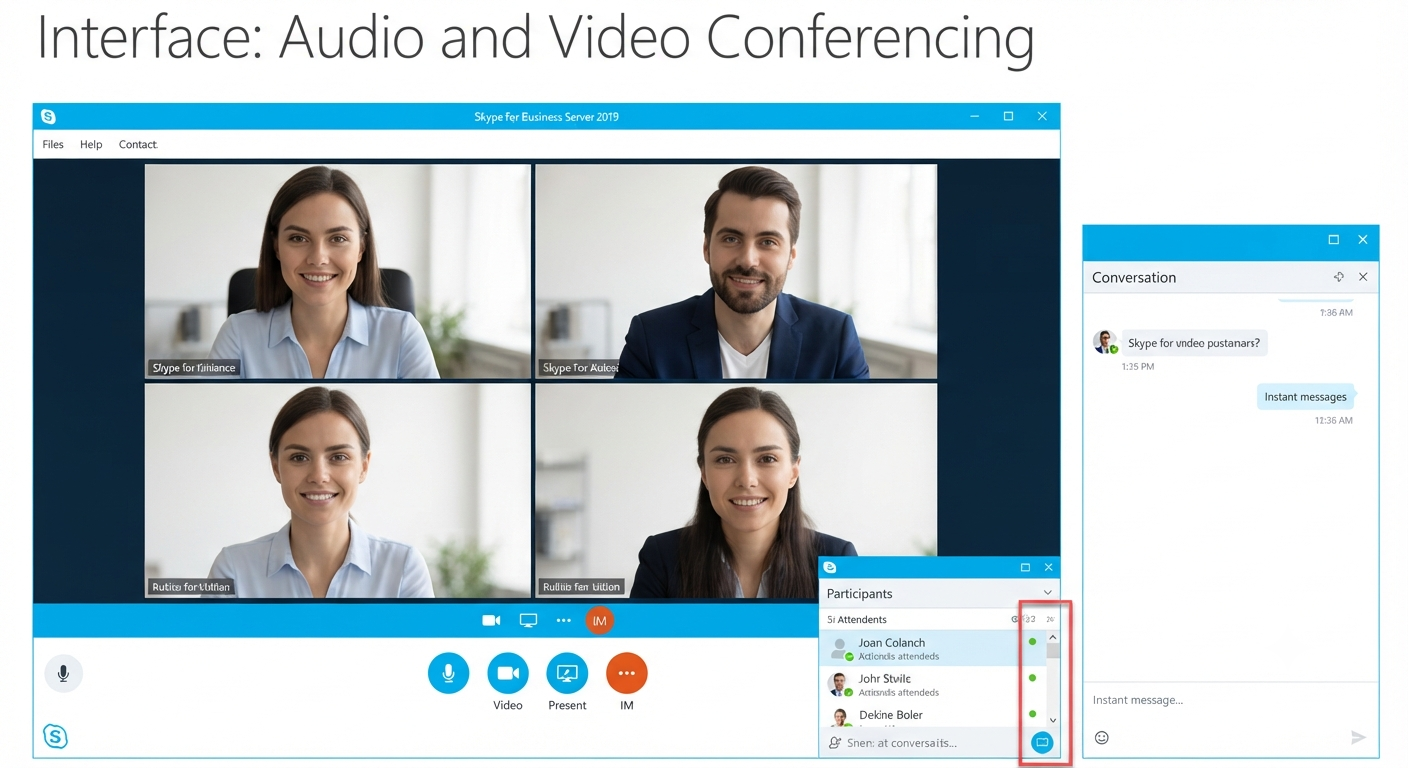
Audio and Video Conferencing
Skype for Business Server 2019 supports high-quality online meetings with multiple participants.
Meeting features include:
- HD video
- Screen sharing
- Whiteboard collaboration
- File sharing
- Meeting recording
- Participant management
These tools facilitate remote collaboration and reduce the need for travel.
Image: Skype for Business Server 2019 online meeting interface.
Integration with Microsoft Office
Skype for Business integrates closely with Microsoft Office applications.
Examples include:
- Outlook meeting scheduling
- Presence indicators in Outlook
- Word collaboration
- Excel sharing
- PowerPoint presentation sharing
This integration helps employees work more efficiently without switching between multiple applications.
Deployment Options
Organizations can deploy Skype for Business Server 2019 in several ways.
On-Premises Deployment
All servers are hosted within the organization’s own data center.
Advantages include:
- Full administrative control
- Data sovereignty
- Custom security policies
- Internal network optimization
This deployment model is common in industries with strict compliance requirements.
Hybrid Deployment
Organizations may combine Skype for Business Server with Microsoft 365 cloud services.
Benefits include:
- Flexible migration
- Cloud-based collaboration
- Simplified management
- Gradual transition to Microsoft Teams
Hybrid environments allow businesses to modernize at their own pace.
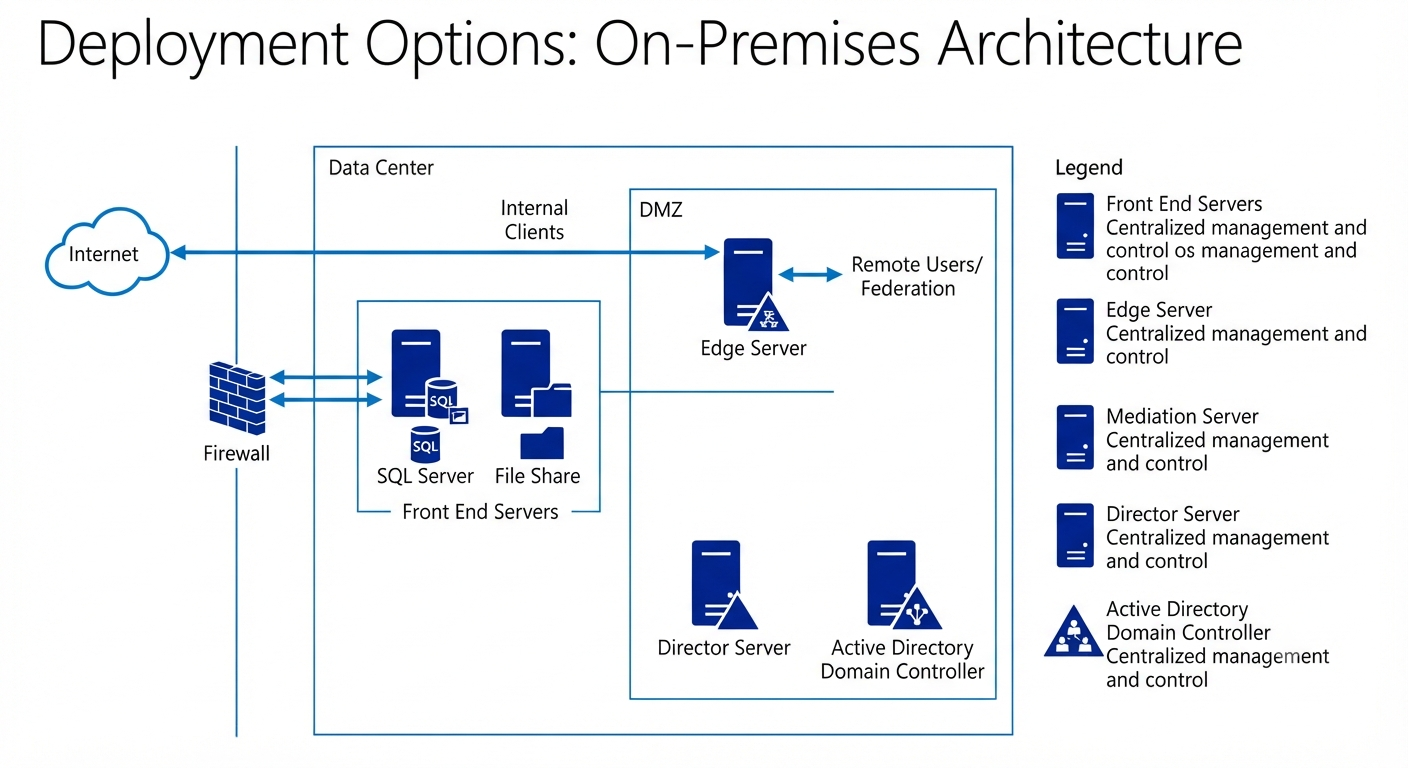
Server Roles
A Skype for Business deployment typically includes several server components.
Common roles include:
- Front End Server
- Edge Server
- Mediation Server
- Director Server
- SQL Server
- File Share
Each component contributes to authentication, conferencing, media processing, or external connectivity.
Security Features
Security remains one of Skype for Business Server’s strengths.
Built-in protections include:
- TLS encryption
- Secure authentication
- Role-based administration
- Certificate-based security
- Access control policies
Organizations can further enhance security by integrating with Active Directory and existing enterprise security infrastructure.
Scalability
Skype for Business Server 2019 supports organizations of various sizes.
Administrators can expand the deployment by adding:
- Additional Front End Servers
- Multiple Edge Servers
- Load balancing
- High availability configurations
This flexibility allows the platform to accommodate growing business requirements.
System Requirements
Before deployment, verify that your infrastructure meets Microsoft’s recommended requirements.
Typical requirements include:
- Windows Server operating system
- SQL Server
- Active Directory Domain Services
- DNS
- Appropriate SSL certificates
Modern hardware improves performance, especially for conferencing workloads.
Administration and Management
Administrators manage Skype for Business Server using:
- Skype for Business Server Control Panel
- PowerShell
- Windows Server tools
PowerShell automation simplifies routine administrative tasks and large-scale deployments.
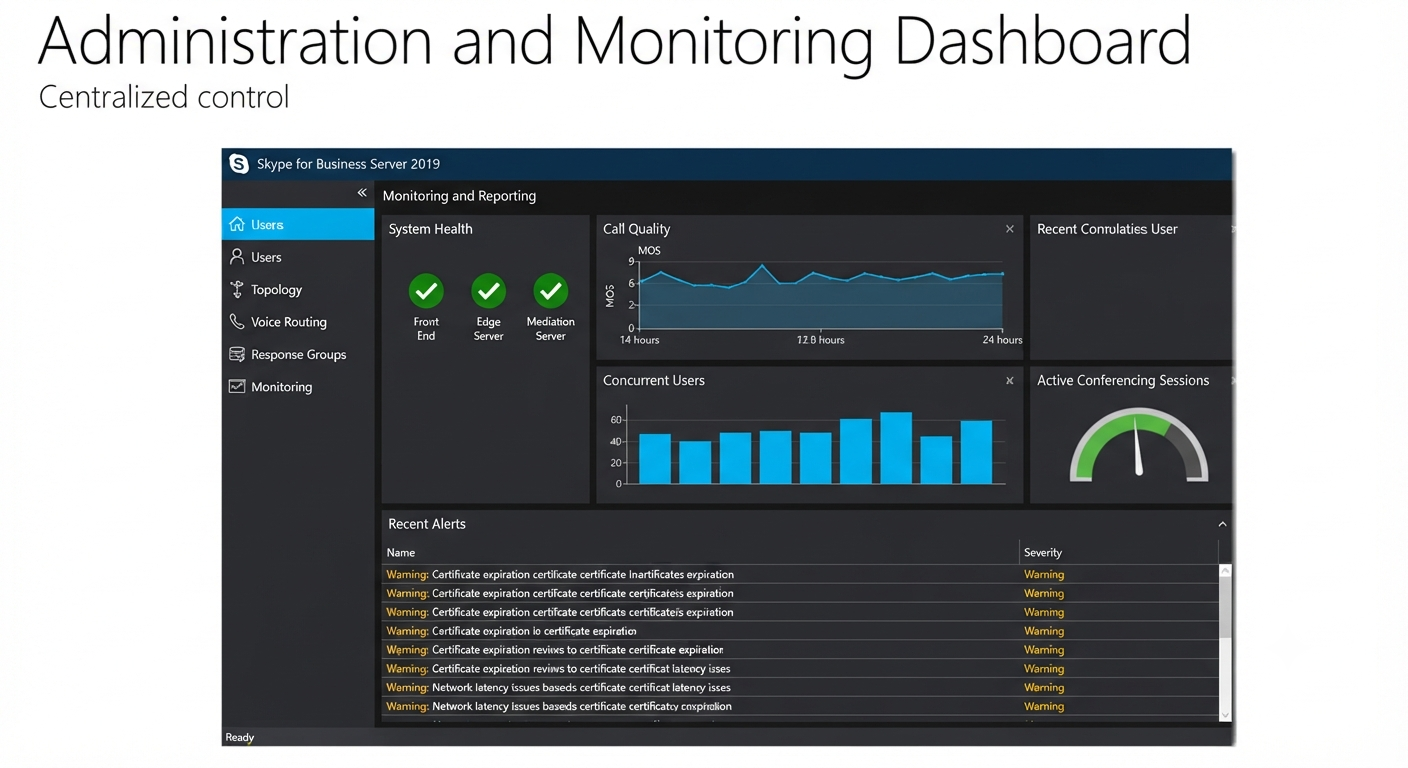
Monitoring and Reporting
Monitoring tools help administrators evaluate system performance.
Common metrics include:
- Call quality
- Network latency
- Conference statistics
- User activity
- Server health
Regular monitoring helps identify issues before they affect users.
Best Practices for Deployment
For a successful deployment:
- Plan network capacity carefully.
- Use high-quality SSL certificates.
- Implement redundancy where appropriate.
- Keep servers updated.
- Monitor system performance regularly.
- Document configuration changes.
Following these practices improves reliability and simplifies troubleshooting.
Migration Considerations
Many organizations currently using Skype for Business Server are evaluating migration to Microsoft Teams.
When planning migration:
- Inventory existing users.
- Review telephony requirements.
- Test interoperability.
- Train end users.
- Migrate in phases when possible.
A structured migration strategy minimizes disruption.
Skype for Business Server 2019 vs Microsoft Teams
Although both platforms support collaboration, there are important differences.
Skype for Business Server 2019
- On-premises deployment
- Enterprise telephony
- Local infrastructure control
- Familiar server administration
- Suitable for organizations with compliance requirements
Microsoft Teams
- Cloud-first platform
- Deep Microsoft 365 integration
- Continuous feature updates
- Built-in collaboration workspaces
- Extensive third-party integrations
Microsoft continues to invest primarily in Teams as its modern collaboration platform.
Common Challenges
Administrators may encounter issues such as:
- Certificate configuration errors
- Firewall restrictions
- DNS misconfiguration
- Audio device compatibility
- Network bandwidth limitations
Proper planning and documentation help reduce deployment problems.
Frequently Asked Questions
Is Skype for Business Server 2019 still available?
Skype for Business Server 2019 remains available for organizations that require an on-premises unified communications solution. However, Microsoft’s collaboration strategy is centered on Microsoft Teams, and organizations should review Microsoft’s current product lifecycle and support documentation when planning future deployments.
Can Skype for Business Server 2019 integrate with Microsoft Teams?
Yes. Microsoft supports various coexistence and migration scenarios that allow organizations to transition from Skype for Business to Teams over time, depending on their environment and licensing.
Does Skype for Business Server 2019 support video conferencing?
Yes. It supports high-definition audio and video meetings, screen sharing, online presentations, and collaboration features for enterprise users.
Can it replace a traditional phone system?
Yes. Through Enterprise Voice capabilities, Skype for Business Server can provide business telephony features such as internal and external calling, voicemail integration, call forwarding, conferencing, and call transfer.
Is an internet connection required?
Internal communication within an on-premises deployment can function on the organization’s local network. However, internet connectivity is typically required for external communication, hybrid deployments, software updates, and certain integrations.
Conclusion
Microsoft Skype for Business Server 2019 remains a capable unified communications platform for organizations that require an on-premises collaboration solution with enterprise-grade security and administrative control. Its support for instant messaging, voice communications, video conferencing, and Microsoft Office integration makes it suitable for businesses that continue to operate traditional server-based communication environments.