


Learn Excel: Advanced Spreadsheet Skills and Data Analysis Techniques
Microsoft Excel is one of the most powerful and widely used tools in the world of business, education, and data management. From simple lists to complex financial models, Excel enables users to organize, analyze, and visualize data efficiently. Excel education is not just about learning formulas—it is about developing analytical thinking, problem-solving skills, and data-driven decision-making abilities.
This article provides a comprehensive overview of Excel education, explaining why it matters, what skills you should master, and how learning Excel can transform the way you work with data.
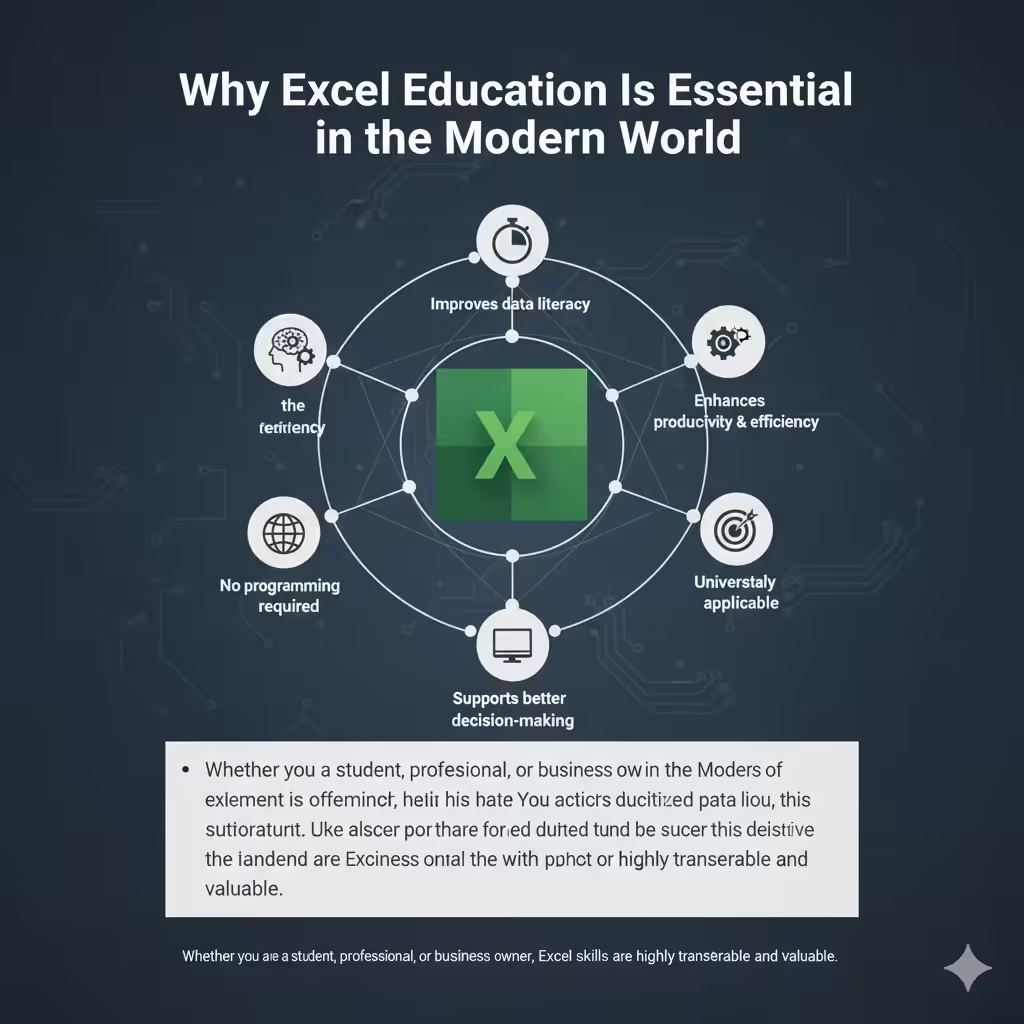
Why Excel Education Is Essential in the Modern World
In today’s digital environment, data is everywhere. Organizations rely on accurate data analysis to make informed decisions, and Excel remains one of the most accessible tools for this purpose.
Excel education is essential because it:
-
Improves data literacy
-
Enhances productivity and efficiency
-
Supports better decision-making
-
Is widely accepted across industries
-
Requires no advanced programming background
Whether you are a student, professional, or business owner, Excel skills are highly transferable and valuable.
Who Benefits from Learning Excel
Excel is not limited to accountants or data analysts. People from many backgrounds benefit from Excel education.
Common users include:
-
Students and educators
-
Office and administrative staff
-
Finance and accounting professionals
-
Data analysts and researchers
-
Engineers and project managers
-
Entrepreneurs and small business owners
Excel adapts to many use cases, making it a universal skill.
Understanding the Excel Interface
A strong foundation begins with understanding Excel’s layout and tools.
Key elements include:
-
Workbooks and worksheets
-
Rows, columns, and cells
-
Ribbon tabs and commands
-
Formula bar
-
Name box
Knowing how these elements work together makes learning advanced features much easier.
Core Excel Skills Everyone Should Learn
Excel education typically starts with core skills that form the backbone of spreadsheet usage.
Data Entry and Formatting
Learning how to:
-
Enter and edit data accurately
-
Format cells, numbers, and text
-
Apply conditional formatting
-
Use styles and themes
Good formatting improves readability and reduces errors.
Basic Formulas and Functions
Formulas are at the heart of Excel.
Essential functions include:
-
SUM, AVERAGE, COUNT
-
MIN and MAX
-
IF statements
-
Basic mathematical operations
Understanding how formulas work builds confidence and efficiency.
Intermediate Excel Skills for Data Analysis
Once you master the basics, intermediate skills unlock Excel’s true power.
Working with Data Tables
Excel tables help you:
-
Manage large datasets
-
Sort and filter information
-
Apply structured references
-
Maintain consistent formatting
Tables make data analysis more reliable and scalable.
Logical and Lookup Functions
Intermediate Excel education focuses on functions such as:
-
VLOOKUP and HLOOKUP
-
XLOOKUP
-
INDEX and MATCH
-
Nested IF statements
These functions allow you to extract meaningful insights from large datasets.
Charts and Data Visualization
Visualizing data helps communicate insights clearly.
Key chart types include:
-
Column and bar charts
-
Line charts
-
Pie charts
-
Combo charts
Excel education emphasizes choosing the right chart for the message you want to convey.
Advanced Excel Skills for Mastery
Advanced Excel skills take your data analysis to a professional level.
Pivot Tables and Pivot Charts
Pivot tables are one of Excel’s most powerful features.
They allow you to:
-
Summarize large datasets quickly
-
Group and aggregate data
-
Analyze trends and patterns
-
Create dynamic reports
Pivot tables are essential for data-driven roles.
Advanced Functions and Formulas
Advanced Excel users work with:
-
Array formulas
-
Dynamic functions
-
Text manipulation functions
-
Date and time calculations
These skills enable complex analysis without external tools.
Data Validation and Error Control
Excel education also teaches:
-
Data validation rules
-
Error handling
-
Protecting worksheets and workbooks
These features help maintain data integrity and accuracy.
Excel for Data Analysis and Decision Making
Excel is widely used as a data analysis platform.
Through Excel education, users learn to:
-
Clean and prepare data
-
Identify trends and outliers
-
Perform scenario analysis
-
Create dashboards and reports
These capabilities support smarter and faster decisions.
Excel in Education and Academia
In schools and universities, Excel is used for:
-
Statistical analysis
-
Research data organization
-
Budget planning
-
Academic reporting
Learning Excel early gives students a strong advantage in higher education and future careers.
Excel in Business and the Workplace
In professional environments, Excel supports:
-
Financial modeling
-
Inventory management
-
Sales tracking
-
Performance analysis
-
Project planning
Excel education directly improves workplace efficiency and effectiveness.
Best Practices for Learning Excel Effectively
To master Excel, a structured learning approach is important.
Effective strategies include:
-
Learning step by step, from basics to advanced topics
-
Practicing with real-world datasets
-
Rebuilding examples from scratch
-
Solving practical problems
-
Reviewing and refining spreadsheets
Consistency matters more than speed.
Common Mistakes Excel Learners Should Avoid
Many learners struggle due to common mistakes:
-
Memorizing formulas without understanding them
-
Ignoring data structure and organization
-
Overusing complex formulas unnecessarily
-
Neglecting documentation and clarity
Excel education should focus on logic and problem-solving, not just features.
The Long-Term Value of Excel Education
Excel skills remain relevant even as new tools emerge.
The long-term benefits include:
-
Strong analytical mindset
-
Better data interpretation skills
-
Easier transition to advanced tools
-
Improved career prospects
Excel often serves as a gateway to broader data and analytics knowledge.
How Excel Skills Support Lifelong Learning
Excel evolves continuously, introducing new features and functions. Excel education encourages:
-
Adaptability
-
Continuous learning
-
Curiosity about data
These qualities are essential in a rapidly changing digital world.
Conclusion
Excel education is far more than learning how to use a spreadsheet—it is about mastering data organization, analysis, and communication. From basic formulas to advanced data analysis techniques, Excel empowers users to work smarter, think critically, and make informed decisions.